Customers can make payments for a receipt using a combination of payment methods. SalesPlay POS System allows users to perform multi-payment transactions.
Example: A customer can pay part of the receipt using Cash and the remaining amount using a Card.
Note: From version 115.5 onwards, the “Use Multi Payment” option has changed. The separate Multi Payment button has been replaced with the new SPLIT feature, offering easier and more flexible multi-payment processing.
How to Enable Multi-Payment
Within Back Office
- Log in to the POS Back Office Web Portal.
- Select Settings from the main menu.
- Go to the Feature section.
- Toggle Multipayment ON.
- Click Save.
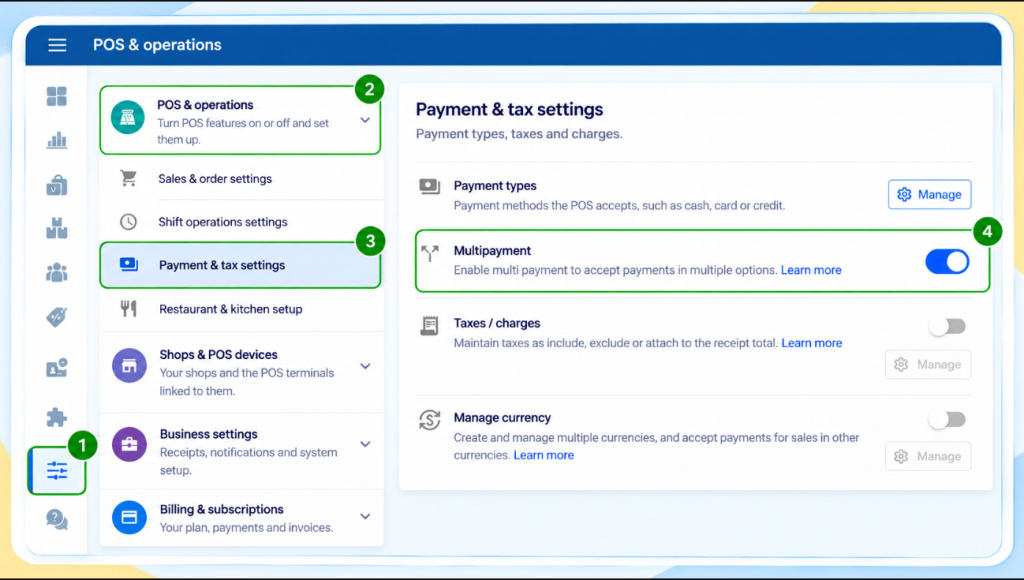
Note: Once Multi-Payment is enabled, all previously created payment types will be downloaded to the POS App payment interface.
Within POS App
- Open the POS App.
- Add products to the cart.
- Click the CHARGE button.
- Tap the SPLIT button at the top-right corner.
- Select the first payment type from the dropdown.
- Enter the payment amount and click CHARGE.
- Click CONTINUE.
- Select the second payment type, enter the amount, and click CHARGE.
- Click DONE to complete the transaction.
You can split payments between cash, card, and other available methods seamlessly.