SalesPlay POS provides complete credit management tools on both the Android POS App and WebPOS, allowing businesses to create credit bills, record customer payments, and monitor outstanding balances.
Credit Billing
Create Credit Bills for customers and allow them to purchase goods or services now and pay at a later date. Credit transactions are automatically recorded against the customer’s account for easy tracking.
Credit Settlement
Record payments against outstanding credit balances using three flexible settlement options:
- Partial Settlement – Collect part of the outstanding amount while keeping the remaining balance open.
- Full Settlement – Settle the customer’s entire outstanding balance in one payment.
- Multiple Settlements – Record multiple payments over time until the full credit balance is settled.
Debtor Management
Manage and monitor customer credit accounts with comprehensive debtor information and reports. View customer-wise outstanding balances, settled amounts, remaining balances, credit transactions, settlement history, and other debtor details to keep track of amounts due and payments received.
Step 1: Enable Credit Billing
- Log in to the Back Office Web Portal.
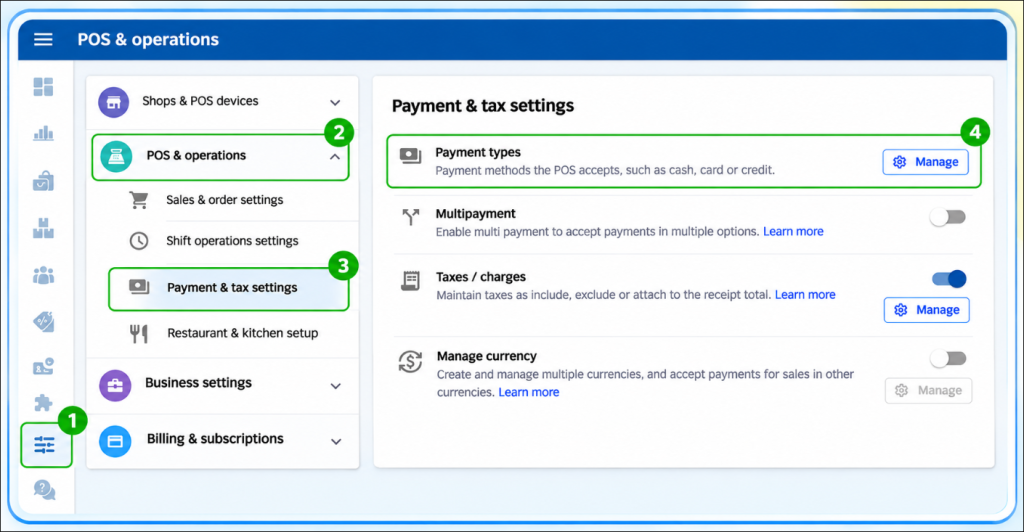
- Select Settings > POS & operations > Payment & tax settings
- Go to Payment Types and click “Manage”
- Click the Credit payment method.
- Toggle the status ON.
- Click Update to save changes.
Step 2: Perform a Credit Sale
- In the POS App main menu, select New Sale.
- Add items to the cart and click Charge.
- Click the Customer icon to add a customer to the receipt (you can add a new customer or search for an existing one). Once added, the icon will show a tick.
- Select the Credit payment option and click Charge.
Step 3: Credit Settlement & Debtor Management
3.1 Access Debtor Management
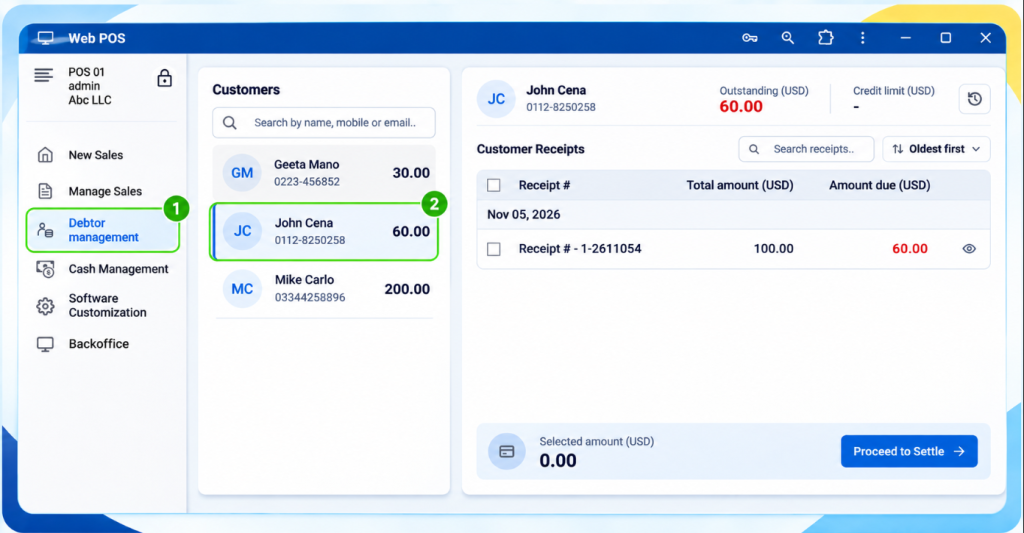
- From the POS App main menu, select Manage Sales.
- Click Debtor Management / Credit Invoice.
- Select the customer from the dropdown menu near All Customers.
Web POS – Manage Customer Credit Settlements (Debtor management)
3.2 Settle Credit Using Customer Profile
- Open the customer profile from the POS App.
- Select the relevant receipt(s) for settlement. You can choose a single receipt, multiple receipts, or a partial amount from a receipt.
- Enter the settlement amount and select the Payment Type from the dropdown (you can create custom payment types in the Back Office).
- Click Settle to complete the transaction.
3.3 Bulk Credit Settlement
- POS App main menu → Select New Sale → Click the Customer icon.
- Select the customer and go to the Profile section → Click Settle Outstanding.
- Tick Select All to settle multiple receipts at once.
- Select the Payment Type and click SETTLE.
- After settlement, you can print the receipt, email it, or share via messaging platforms.
- Settle multiple selected credit receipts
- Partial settlement of individual credit receipts
- Bulk credit settlement in one transaction